Looking for realistic hair CC for Sims 4? Here are the creators and packs I’ve actually tested for natural strands, shine, and movement. The best realistic hair CC for Sims 4 comes from Alpha CC creators like Ade_Darma, Anto, Wingssims, LeahLillith, and Redheadsims.
Realistic hair CC is one of those categories where the difference between “good enough” and “genuinely great” really shows up in the details — strand texture, color blending, and how the hair sits under real lighting. Start with a couple of packs from the creators above, pair them with a matching skin type, and turn on the HQ mod before you judge how realistic anything actually looks in your game.
These creators focus on fine strand detail, natural shine, and hair movement that mimics real photography rather than the base game’s cartoon-style hair. Realistic hair pairs best with Alpha or realistic skin overlays and looks best with the HQ mod enabled for extra close-up detail.
Realistic Hair CC vs. Regular Alpha Hair CC, Not all Alpha hair is automatically realistic — this trips a lot of people up.
| Regular Alpha Hair | Realistic Hair CC | |
|---|---|---|
| Strand detail | Often flat or low-detail near the roots | Visible fine strands, especially at the part |
| Color | Single flat tone per swatch | Blended, multi-tone swatches |
| Movement | Stiff, symmetrical shape | Slight asymmetry, natural flyaways |
| Best paired with | Any skin type | Alpha or realistic skin overlays |
Sims 4 Realistic Hair CC
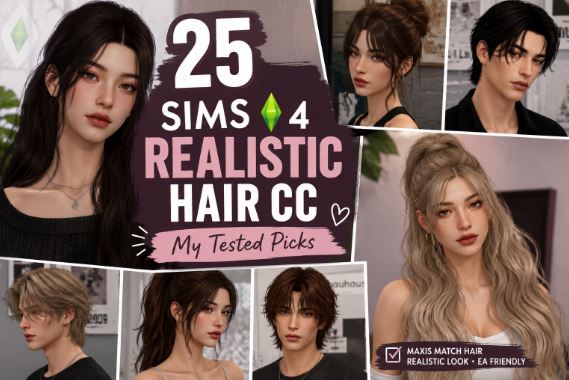
Base game hair in Sims 4 gets the job done, but it’s never going to look like an actual head of hair. It’s flat, a little too smooth, and doesn’t really catch light the way real strands do. If you’re chasing that “is this a sim or a real photo” look, you need realistic hair CC — and there’s a huge difference between packs that just claim to be realistic and ones that actually deliver.
I’ve spent a lot of time testing hair CC in CAS under different lighting, on different skin tones, and with different body presets. This guide covers the creators and packs that consistently hold up, what actually makes hair CC look realistic instead of just “high poly,” and how to avoid the mistakes that ruin an otherwise great CAS look.
What Actually Makes Hair CC Look Realistic?
A lot of hair CC gets labeled “realistic” just because it’s Alpha style, but that’s not the whole story. In my experience, a few specific things separate genuinely realistic hair from hair that just looks busy:
- Fine strand detail at the roots and part line. Cheap hair CC often has a solid, painted-on scalp. Good realistic hair has visible individual strands near the part.
- Natural light response. Realistic hair should have soft highlights that shift a little as your sim turns their head, not one flat shine painted across the top.
- Weight and movement. Real hair doesn’t sit perfectly still. The best hair meshes have slight asymmetry — a few flyaway strands, uneven layers — instead of a mirror-perfect shape.
- Color depth. Realistic hair swatches usually blend two or three tones instead of one flat color, which is what gives real hair its depth in natural light.
If a hair pack is missing all four of these, it’s probably going to look more like a wig than actual hair, even if it’s technically labeled Alpha CC.
Best Realistic Hair CC Creators
1. Ade_Darma
Ade_Darma is one of the most consistent names when it comes to realistic, celebrity-inspired hairstyles. Their catalog leans heavily into long, wavy, and straight styles with strong strand definition and generous swatch counts. I’ve found their hair holds up especially well in close-up CAS shots, which is usually where lower-quality hair CC starts to fall apart.
Best for: Long and medium-length realistic styles with lots of natural color options.
2. Anto
Anto makes both Alpha and Maxis Match hair, but their Alpha work is where the realism really shines — pun intended. Their hand-drawn textures give hair a softer, more natural gradient instead of a flat dye-job look, and several styles include multi-tone color options like roots-to-tips blending for extra realism.
Best for: Multi-tone, dimensional color looks.
3. Wingssims
Wingssims leans glam and voluminous, but that volume comes with genuinely detailed strand work, which is part of why their hair reads as realistic instead of just “big.” Curly and wavy styles in particular hold shape and shine convincingly.
Best for: Curly and voluminous realistic styles.
4. LeahLillith
LeahLillith’s hair has been a staple in realistic CC builds for a long time because of how naturally it drapes and moves with the sim’s body. Longer styles especially benefit from the way the mesh handles weight — it doesn’t sit stiff against the shoulders the way a lot of older hair CC does.
Best for: Long, flowing styles that need to look natural from multiple angles.
5. Redheadsims
Redheadsims is well known in the realistic CC space, and their hair work fits right alongside their skins and makeup, with a similar attention to natural light and shadow. Their styles tend to look especially good under moody or cinematic lighting mods.
Best for: Sims built for atmospheric, editorial-style screenshots.
6. Nightcrawler Sims
Better known for skins, Nightcrawler Sims also has hair CC that’s built to match their realistic skin overlays specifically, which means less trial and error getting the tones to work together.
Best for: Simmers who already use Nightcrawler skins and want a cohesive look.
7. Obscurus-Sims
Obscurus-Sims is a long-running creator with a hair catalog that spans a wide range of textures, including curl patterns that are genuinely underrepresented in a lot of “realistic” CC lists. Worth checking out if you want realistic textured and curly hair, not just straight and wavy styles.
Best for: Realistic curly and coily hair textures.
How to Get the Most Realistic Look Possible
- Turn on the HQ mod. This is the single biggest upgrade for realistic hair. It sharpens close-up textures significantly, especially strand detail near the hairline.
- Pair hair with a matching skin type. Realistic hair on a Maxis Match face usually looks disconnected, like it’s floating slightly above the head. Match Alpha hair with Alpha or realistic skins for the best blend.
- Watch your lighting mods. A lot of realistic hair CC was clearly built and photographed with reshade or lighting mods active. Base game lighting can flatten even good hair CC, so don’t judge a pack purely on how it looks with default lighting.
- Check hat compatibility before you commit. Some realistic hair styles clip badly under hats and hoods. Creators usually note this on the download page — read it before building an outfit around a specific hairstyle.
Common Mistakes With Realistic Hair CC
- Mixing too many creators’ textures in one shot. Every creator has a slightly different texture style. Two “realistic” hairs from different creators can clash more than you’d expect when they’re both visible at once (think eyebrows vs. hair).
- Ignoring age range. A lot of the most detailed realistic hair is teen-through-elder only. If you’re playing multi-generational families, check this before falling in love with a style.
- Skipping the HQ mod. Realistic hair CC is specifically built to take advantage of higher texture detail. Without the HQ mod, you’re not seeing the pack at its best.
- Downloading from reupload sites. Realistic hair CC files tend to be larger and more detailed, which makes reuploads more likely to be compressed, outdated, or missing swatches. Go to the original creator’s page when you can.
FAQs
1. What’s the difference between Alpha hair and realistic hair CC? All realistic hair CC is Alpha style, but not all Alpha hair is realistic. Realistic hair specifically has fine strand detail, blended color tones, and natural movement, while some Alpha hair is still fairly flat and stylized.
2. Does realistic hair CC work with Maxis Match skins? It can, but it usually looks disconnected from the face. Realistic hair blends best with Alpha or realistic skin overlays.
3. Why does my realistic hair CC look blurry? This is usually a texture resolution issue. Enabling the HQ mod significantly improves close-up detail for realistic hair CC.
4. What is the HQ mod and do I need it? The HQ mod increases texture resolution for close-up shots in CAS and live mode. It’s not required, but it makes a noticeable difference with detailed realistic hair CC.
5. Which creators make the most realistic curly or textured hair? Obscurus-Sims and Wingssims both have strong catalogs for realistic curly and textured hairstyles, alongside their straight and wavy options.
6. Can I use realistic hair CC on child or toddler sims? Some packs include younger age ranges, but many realistic hair styles are teen-through-elder only. Always check the listed age range before downloading.
7. Why does my hair CC clip through hats? Not every hairstyle is built with hat compatibility in mind. Check the creator’s page — many list whether a style is hat-compatible before you download.
8. Is realistic hair CC safe to download? Downloading directly from the creator’s Patreon, personal site, or CurseForge page is the safest route. Reupload sites are more likely to have outdated or altered files.
9. Do I need reshade or lighting mods for hair CC to look realistic? No, but they help. A lot of realistic hair CC is designed and previewed with lighting mods active, so it may look flatter under default game lighting.
10. Can I mix realistic hair with Maxis Match clothing? You can, though it’s a matter of taste. Many simmers use a “Maxis Mix” approach, blending Alpha hair with Maxis Match clothing and makeup for a middle-ground style.
11. Why does hair from one creator look different from another on the same sim? Every creator uses a slightly different texture and lighting approach. Mixing multiple hair creators’ work in one CAS look is fine, but it can occasionally clash in tone or shine level.
12. How often do these creators update their hair CC? It varies by creator. Many post regularly on Patreon with early access, then release to CurseForge or their public site later. Checking their most recent posts is the best way to find current links.