Struggling to find good curly and textured hair CC for Sims 4? Here are my tested picks, top creators, and tips to avoid common CAS problems. The best curly and textured hair CC for Sims 4 comes from creators like Ebonix, XXBlackSims, SheaButtyr, KikoVanity, Dogsill, and Oakiyo.
Curly and textured hair CC has come a long way in the Sims 4 community, largely thanks to creators who put real care into representing different curl and coil patterns accurately. These packs range from tight coils and twist-outs to locs, Bantu knots, and loose curls, and are available in both Maxis Match and Alpha styles.
Start with a couple of CC Hair packs from the list below, check age range and hat compatibility before you build around them, and don’t be afraid to mix Maxis Match and Alpha hair between different sims in the same save if it suits each one better.
| Style | Best For | Texture Type | CC Type |
|---|---|---|---|
| Defined afro with volume | Natural hair Sims | 4A–4C coils | Maxis Match & Alpha |
| Twist-out with baby hairs | Everyday natural looks | 3C–4A curls | Alpha |
| Loose curly bob | Casual, softer curls | 2C–3A waves/curls | Maxis Match |
| Locs (short or long) | Protective style Sims | Coily/locked hair | Maxis Match & Alpha |
| Curly male fro | Male natural hair | 3C–4B coils | Maxis Match |
Best Sims 4 Curly & Textured Hair CC
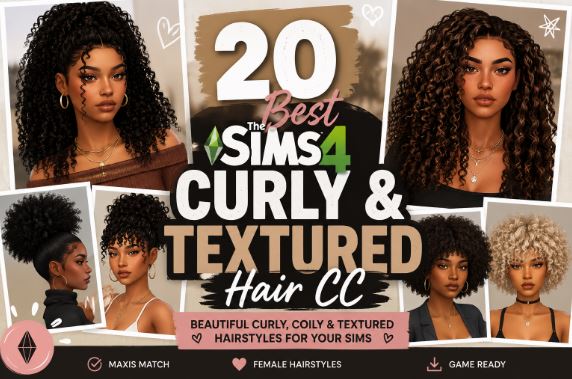
The Sims 4’s built-in curl and coil options are limited, and the few that exist often look stretched, flat, or just not quite right once you’re out of the CAS thumbnail. If you’ve ever tried building a Sim with a proper afro, a defined twist-out, or tight natural coils using only base-game hair, you know exactly what I mean.
I went through a big stack of curly and textured hair CC, tested it in CAS, and checked how it actually holds up in different lighting and camera angles. This list focuses on the creators who consistently nail curl definition, volume, and realistic texture — not just a recolored version of the same loose-wave mesh everyone else uses.
Below you’ll find my picks for curls, coils, and protective styles, split roughly by texture type, along with install tips and a few mistakes to avoid.
What to Look for in Good Curly or Textured Hair CC?
Not all “curly hair” CC is created equal. A few things separate the packs worth downloading from the ones that look flat once you’re in-game:
- Curl definition that holds up at a distance, not just in a close-up CAS thumbnail.
- Realistic volume and shrinkage for tighter coil patterns, instead of curls that look stretched out to fake length.
- Baby hairs and edge detail, which add a lot of realism to natural hairstyles.
- A genuine range of natural color swatches, not just black, brown, and a couple of unnatural fantasy colors.
- Base game compatibility, so the hair works even if you don’t own every expansion pack.
Best Curly & Textured Hair CC by Style
Afros and Natural Coils
Ebonix is one of the most respected names in this space. Danielle Udogaranya, the creator behind Ebonix, has built a reputation for realistic afro-textured hairstyles that actually capture coil pattern and shrinkage instead of just widening a curl mesh. Several packs come with kid and toddler versions too, which is genuinely rare in this category.
Best for: Sims wanting an authentic, well-defined natural afro across multiple life stages.
XXBlackSims also has a strong afro and curly hair catalog, with tightly coiled textures and realistic detailing. I like that many of their styles are designed with a side or middle part option, giving you more variety without needing to download multiple separate files.
Best for: Adding asymmetry and part variation to natural curl styles.
Twist-Outs, Braid-Outs, and Defined Curls
SheaButtyr leans into natural texture with a Maxis Match finish, which makes it a great pick if the rest of your CC collection is Maxis Match and you don’t want the hair to look out of place. Their locs and twist collections in particular have good movement.
Best for: Maxis Match saves that still want authentic natural texture.
KikoVanity covers a wide range of contemporary, trend-driven textured styles. I’ve found their hair holds detail well in both CAS and live mode, which isn’t always true for CC that looks great in a static pose but flattens out during animations.
Best for: Trend-forward natural styles that still look good in motion.
Loose Curls and Curly Bobs
Dogsill has a solid catalog of curly and afro-adjacent hair that’s often built as a mesh edit of existing EA hair, which keeps it base-game compatible. That matters a lot if you don’t own every expansion pack — you still get access to good texture without needing a specific pack installed.
Best for: Simmers who want quality curly hair without worrying about pack requirements.
Oakiyo is worth checking for softer, looser curl textures and braid styles that frame the face nicely. Their hair tends to have a slightly more polished, styled look rather than a natural, undone texture.
Best for: Curly styles with a more “finished” salon look.
Locs and Protective Styles
If you’re specifically after locs, twists, or Bantu knots, look at loc-focused collections from SheaButtyr and Black hair CC roundups that include creators like Khadijah551, who focuses on natural hair textures and cultural styles. These protective styles carry real cultural significance, and it’s worth reading the creator’s notes if they’ve included any context about the style.
Best for: Sims with long-term protective hairstyles as part of their look.
Male Curly & Textured Hair Picks
Curly and textured hair for male sims is a smaller category, but a few creators consistently deliver:
- kyrzwrld makes original mesh curly and natural fro styles with base-game compatibility, and several work well across male frames.
- Dogsill’s afro and curl mesh edits often include male-frame versions alongside the female ones.
- Watch for hair that was clearly built for a female headshape first — it can sit oddly around the temples on some male face presets, so always preview before committing.
Maxis Match vs. Alpha for Curly Hair
This decision matters even more for curly and textured hair than for straight styles, because curl detail reads very differently depending on render style.
Maxis Match tends to simplify curl texture into smoother, rounder shapes. It blends better with the base game but can lose some fine coil detail.
Alpha hair usually shows individual strand and curl detail much more clearly, which a lot of players prefer for natural hair specifically, since it can better represent coil pattern and shrinkage. The tradeoff is that it needs an Alpha skin and eyes to look cohesive.
If natural hair texture is the main thing you care about, Alpha is generally the stronger choice — but only if the rest of your CC collection is already Alpha.
How to Install Curly Hair CC in Sims 4?
- Download the
.zipor.packagefile from the creator’s page. - Extract the
.zipif needed so you’re left with the.packagefile. - Move the
.packagefile intoDocuments > Electronic Arts > The Sims 4 > Mods. - In-game, go to Game Options > Other and confirm “Enable Custom Content and Mods” is turned on.
- Restart the game if it was already running when you added the file.
Pro tip: If a curl style looks stretched or oddly shaped in CAS, try adjusting your in-game graphics settings to a higher texture quality before assuming the file is broken. Some detailed curl textures render poorly on lower settings.
Common Mistakes to Avoid
- Assuming all “curly hair” tags mean the same texture. A 2C loose curl and a 4C coily style are very different, so check screenshots closely rather than relying on the tag alone.
- Skipping the age range check. Many curly and textured hair packs are teen-through-elder only, so verify before building a full family around one style.
- Not checking hat compatibility. Voluminous curl and afro styles often clip badly with hats and hoods unless the creator specifically built a compatible version.
- Downloading from re-upload sites. Go to the original creator’s Patreon, blog, or CurseForge page whenever possible. Re-uploads are more likely to be outdated or missing files.
- Ignoring creator credit. Many of these creators are independent artists supported by their community. Crediting them when you share your Sims helps keep this content coming.
FAQs
1. What is the best curly hair CC for Sims 4? Ebonix, XXBlackSims, and SheaButtyr are among the most consistently recommended creators for realistic curly and afro-textured hair CC in Sims 4.
2. Is there good textured hair CC for male sims? Yes, though the selection is smaller. Creators like kyrzwrld and Dogsill offer curly and natural fro styles built for male frames.
3. Why does my curly hair CC look stretched out in-game? This can happen if your in-game texture quality is set low, or if the hair mesh simply wasn’t built with strong curl definition. Try raising your graphics settings first before assuming the file is broken.
4. Is Maxis Match or Alpha better for natural hair textures? Alpha hair tends to show more individual curl and coil detail, which many players prefer for natural textures, but it needs an Alpha skin to look cohesive with the rest of the sim.
5. Does curly hair CC work for kids and toddlers? Some packs include kid and toddler versions, but many don’t. Check the age range listed on the download page before building a multi-generation household around one style.
6. Can I use curly hair CC without owning all the expansion packs? Yes, as long as the pack is listed as “base game compatible.” Several creators, like Dogsill, specifically build mesh edits that don’t require extra packs.
7. Why does my curly hair CC clip through hats? Voluminous curl and afro styles are prone to hat clipping unless the creator built a separate hat-compatible version. Check the creator’s notes before pairing hair with headwear.
8. Are locs and Bantu knots available as Sims 4 CC? Yes. Several creators, including SheaButtyr and Khadijah551, offer locs, twists, and Bantu knot hairstyles as part of their natural hair collections.
9. How do I install curly hair CC? Download the .package file, place it in your Mods folder (Documents > Electronic Arts > The Sims 4 > Mods), and make sure Custom Content is enabled in Game Options.
10. Why do some curly hairstyles look different across body or head presets? Hair meshes are built for a standard head shape and don’t always adjust perfectly to heavily edited face sliders, which can cause minor clipping around the hairline.
11. Is it safe to recolor curly hair CC and share it? It depends on the individual creator’s terms of use. Some allow recoloring with credit, others don’t — always check before redistributing.
12. Where can I find updated download links if one is broken? Check the creator’s most recent Patreon or blog posts, since files occasionally move when a creator changes hosting platforms.